Best Crypto Wallets

What are the Best Crypto Wallets in 2026

There many great Crypto Wallets available to use in 2026, which can make deciding which one to pick difficult. We will cover what types of crypto wallets you have to chose from, what you should use them for and the differences between them.

What is a Crypto Wallet?

You can think of a Crypto Wallet much like your physical wallet. It is a place for you to store and use your Crypto Currencies in whatever way you wish.

However there is one key difference, your Crypto Wallet doesn’t actually ‘store’ your coins like a physical wallet stores your cash. This is because your coins live on the blockchain. What your crypto wallet actually does is store your private keys.

Your private key is a set of (usually 24) key words that act like a secure encrypted password. This private key is used to prove to the blockchain you are interacting with that you do infact own your coins/tokens and that you have the authority to initiate transactions with them. 

What can you do with a Crypto Wallet

You can do plenty of things with Crypto Wallets, including but not limited to:

  • Send Crypto to other wallets
  • Receive Crypto from other wallets
  • Store NFT’s
  • Connect to Web3 apps (Games / DeFi, dApps etc)
  • Track your balance(s)

Types of Crypto Wallets

When thinking about Crypto Wallets there are 2 main differences.

Hot Wallets: This is a wallet that is connected to the internet. These are probably the most common type of Crypto Wallet as they’re very easy to setup and don’t require any initial purchase of a device etc. They’re also very easy to use and integrate with many crypto services seemlessly. The most widely used Hot Wallets are:

Both of these have browser extensions for virtually every browser you are likely to come across. They’re very similar in terms of functionality and so the choice basically comes down to personal preference.

Cold Wallets: These are wallets that are not connected to the internet. They are physical devices that store your private keys and your private keys never leave the device itself. This is by far and away the most secure way of storing your tokens.

They are however best suited to long term holding as they’re not as easy (or sometimes completely unable) to integrate with Web3 apps like Hot Wallets are.

The most common Cold Wallets are:

As Cold Wallets are physical devices they do require an upfront purchase. However I would recommend anyone who is serious about storing crypto, especially long term, to invest in a Cold Wallet as early as possible.

At the time of writing, you can pick up a Ledger Nano S (the cheapest Ledger) for £43 / $60

Ledger Wallet vs Trezor Wallet

Lets compare the differences between Ledger Wallet and Trezor wallet. I will use the mid tier offerings for each to make it a fair comparison. 

Ledger Wallet

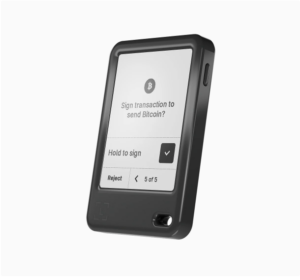
Ledger Wallet - Nano Gen5

The Ledger Nano Gen5 is a great hardware wallet for storing your crypto. Ledger is my favourite hardware wallet provider.

Featuring a 2.8″ E Ink® screen  giving you piece of mind when processing transactions.

Key features of the Nano Gen5 include:

  • EAL6+ Secure Element Chip
  • Runs Ledger OS (great eco-system for interacting with your crypto)
  • 2.8″ touchscreen display
  • USB-C + Bluetooth and NFC connectivity
  • Mobile and Desktop Apps
Browse Ledger Devices

Trezor Wallet

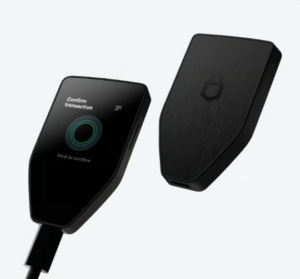
Trezor Wallet - Safe 5

The Trezor Safe 5 is a great alternative if you’d prefer not to use Ledger or their prices are a little too steep.

Featuring a 1.54″ colour touchscreen with a vibrant display to manage your transactions.

Key features of the Trazor Safe 5 include:

  • EAL6+ Secure Element Chip
  • Runs Trevor Suite app (Trezors competition with the Ledger OS ecosystem)
  • 1.54″ colour touchscreen display
  • USB-C only connectivity
  • Mobile and Desktop Apps
Browse Trezor Devices

As you can see, both devices are very similar in what they offer. Both of them support 1000’s of Crypto Tokens natively, but there are some key differences to consider. Mainly, that Trezor only offers USB-C connectivity whilst the Ledger Nano Gen5 offers Bluetooth and NFC aswell.

However the Trezor offers a colour touchscreen display where is the Ledger (whilst a larger display) is E Ink®

Both offer comparible security in the EAL6+ Secure Element Chip and both offer Mobile and Desktop apps for interacting with your crypto. 

Note: Comparable Ledger devices are often slightly more expensive than its Trezor counterparts, however they regularly run promotions thats come with a certain amount of free Bitcoin with every purchase (the amount depends on what Ledger Device you purchase). At the time of writing, you will get $10 in Bitcoin for free if purchasing a Ledger Nano Gen5

How to Earn Crypto online?

If you’re looking for ways to increase your crypto holdings, we have created some guides on some of the best cryptocurrency projects to earn/acquire cryptocurrencies. Why not check them out:

Leave a Reply

Your email address will not be published. Required fields are marked *